Automation
How to Build Your Own AI Discount Finder
Less noise. More control. Systems that respect your privacy.
In today’s marketing landscape, tracking discounts often means exchanging your privacy for convenience. Brands ask you to subscribe, download apps or create accounts. They collect your preferences, follow your browsing and bombard you with promotions that may or may not be relevant.
What if you could flip the script? What if you could quietly monitor the products and services you care about, without telling anyone you’re watching, and only get notified when the price really drops?
TL;DR
- Build a simple AI-powered system that checks the pages you care about and alerts you when something is on sale
- Avoid newsletters, apps and loyalty programs. You stay in control of your data
- Start with a short list of items and run the check on a schedule you set. Expand as you go
Why Do Most Discounts Require You to Give Away Your Data?
Most traditional deal-finding tools operate on a simple trade-off: your attention for their information. To see a discount, you sign up for an email list, install an app or hand over your shopping habits to a loyalty program.
This exchange is profitable for retailers because your data is often more valuable than the discount itself. The result is a messy inbox, constant push notifications and a feeling that you’re always reacting to someone else’s agenda.
What If You Could Track Deals Without Signing Up Anywhere?
Imagine a system that keeps an eye on the things you care about, but doesn’t ask for your email, your preferences or your shopping history.
Instead of subscribing and hoping to see the right deal, you create a private list of URLs. A product page. A subscription pricing page. A special flight route. Then you let an automated script fetch those pages periodically.
When a price drops or a sale appears, you get a concise summary in your inbox. No logins. No apps. Just timely information.
How It Works
At its core, an AI discount finder is a workflow you control. The architecture looks something like this:
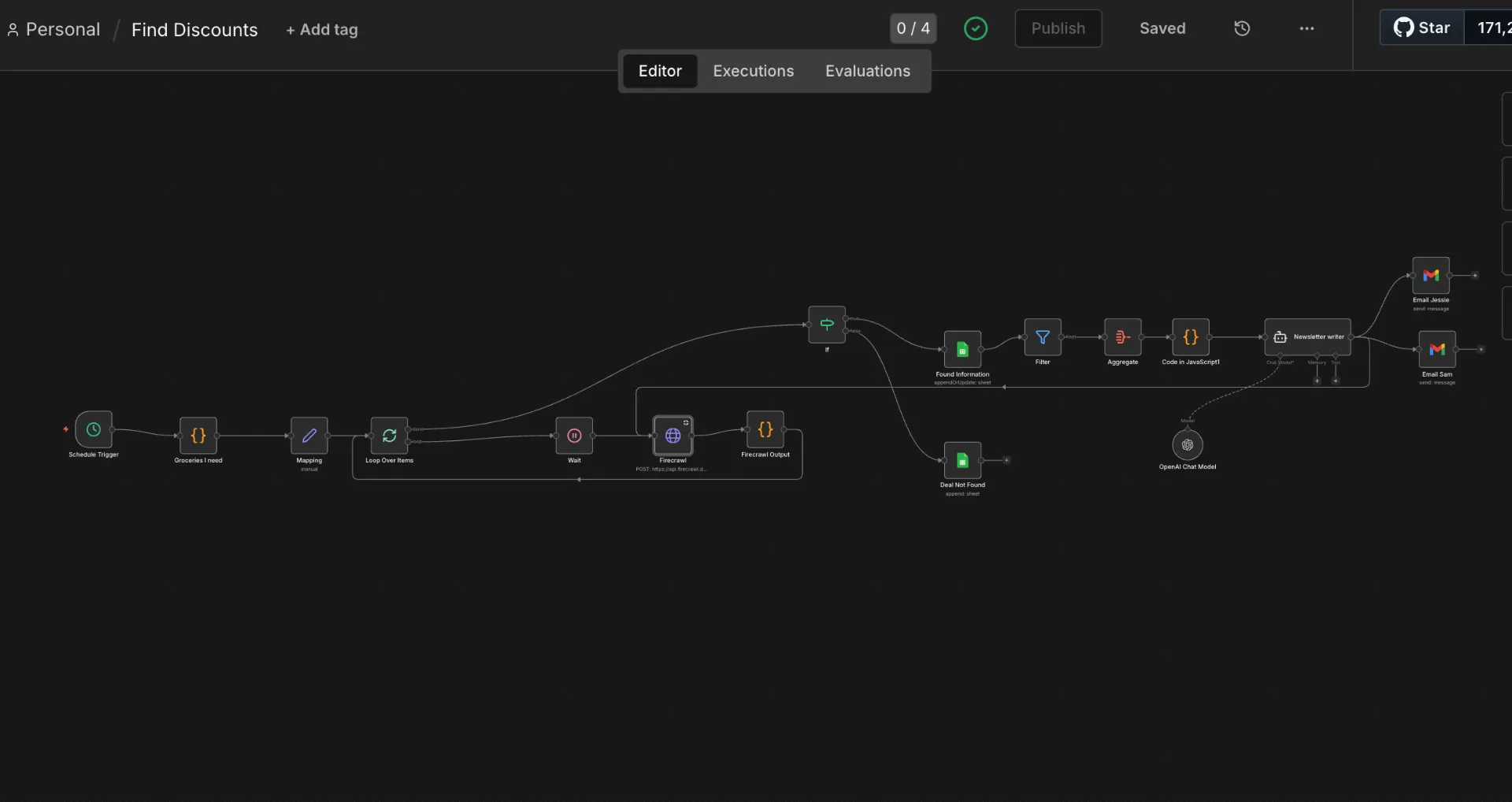
AI Discount Finder workflow built with n8n and Firecrawl
Schedule Trigger: Runs the process at intervals you choose (for example, every four days).
Personalised Wish-List: Defines the URLs you want to watch.
Firecrawl Scraping: Sends each URL to Firecrawl, an API that scrapes web pages and returns content in multiple formats. You will need to sign up and obtain an API key to use it.
Price Comparison: Checks whether the current price differs from the original price. If it does, it flags that item as a deal.
AI Summarisation: An AI model summarises the list of deals into human-readable language. Think of it as your private newsletter.
Notification Delivery: The summary is delivered to you by email, Slack or any channel you prefer.
This framework isn’t limited to groceries. You can monitor anything with a public URL: SaaS subscriptions, gym memberships, flights, online courses or even digital products. If the page displays a price, your system can track it.
How to Design Your Wish-List
Begin small. Open a note or spreadsheet and add the URLs of the products or services you buy regularly. Include a label for the retailer so you can group items later.
The best part about designing your own wish-list is that nothing is fixed: you can add or remove items whenever your needs change. Over time, you can even expand into categories you hadn’t considered, like tracking the annual price of a streaming service or the cost of a flight route for an upcoming trip.
Choosing a Schedule That Works for You
One of the biggest advantages of building your own discount finder is control over timing.
Set the workflow to run daily if you’re tracking prices that change quickly, such as airfares. Run it weekly or every four days for groceries or subscription services where prices change less often.
The right cadence balances the need to catch deals with the desire to avoid unnecessary pings. In the example workflow, we chose to run it every four days to avoid clutter.
Let AI Summarise the Results
An unfiltered list of price changes isn’t helpful on its own. Once your workflow aggregates items with real deals, send them to an AI model with a simple instruction: summarise the items that have lower prices than before.
The model returns a concise paragraph highlighting what’s on sale, where to find it and why it matters. This is your private newsletter: only when something meaningful happens do you receive a message.
There are no daily digests or generic marketing blasts, just relevant information when you need it.
Customisation and Scale
This system can be as simple or sophisticated as you like. Start with a basic wish-list and a single rule (for example, notify me when the price drops by at least 10%).
As you grow comfortable, you can incorporate more complex logic: maybe you want to see deals only for items over a certain value, or you want to track competitor prices to see if they undercut your usual retailer.
Because you control the workflow, you can connect it to other tools, such as spreadsheets for logging historical prices or chat applications for sending yourself a weekly digest.
Putting It All Together
By listening to your audience and understanding the frustrations people express in forums and comment sections, you’ll know how to frame your content and the keywords your ideal readers use. But when it comes to building the discount finder itself, the principle remains simple:
Create a list. Automate the scraping. Evaluate the deals. Summarise what matters. Deliver it to yourself on your terms.
This approach respects your privacy and your time. It flips the script from companies owning your data to you owning your process.
Most importantly, it works quietly in the background, so you can focus on what matters until there’s a reason to act.
Frequently Asked Questions
Do I need to be a programmer to build this?
While some technical steps are involved, the process is designed to be accessible. You will be using APIs and setting up workflows, which can be learned with the right guidance. No-code tools like n8n or Make can simplify the process significantly.
How does Firecrawl work?
Firecrawl is an API that scrapes web pages. You send it a URL, and it returns the content in various formats including markdown, HTML, and structured data. It handles JavaScript rendering, bypasses common anti-bot measures, and supports multiple output formats. You will need an API key to use it.
Can this track subscription prices?
Yes, if the subscription pricing is publicly available on a URL, your AI discount finder can monitor it. This works for SaaS products, streaming services, gym memberships, and any other subscription with a public pricing page.
What if a website has anti-scraping measures?
Services like Firecrawl are designed to handle many anti-scraping measures. For highly protected sites, you might need to explore more advanced solutions or rendering services. Most standard e-commerce and pricing pages work without issues.
How often should I run the workflow?
It depends on what you are tracking. Daily for volatile prices like flights or limited-time deals. Every 4 days for groceries or subscription services. Weekly for items that rarely change. The key is balancing deal detection with avoiding unnecessary notifications.