
AI & Automation
Turning an n8n AI Agent Into a Voice Assistant With ElevenLabs
Build voice-in, voice-out assistants with n8n and ElevenLabs
This post shows how to turn an AI agent built in n8n into a voice assistant using ElevenLabs.
We build two setups:
- A Telegram-based agent that takes a voice message, runs AI on it, and sends back a synthesized audio reply.
- A real-time ElevenLabs conversational agent that talks on the phone, calls an n8n webhook as a tool, and gets researched answers back.
Main idea
The main idea is simple: n8n orchestrates the logic, while ElevenLabs handles voice.
We start with paper-first diagrams so the system is easy to understand before building the workflows.
Workflow 1: Telegram voice reply
This setup creates a voice-in, voice-out assistant inside Telegram.
Flow:
- Telegram node receives a voice note
- The audio file is downloaded
- ElevenLabs transcribes speech to text
- An n8n AI Agent node (chat model) generates a professional assistant response
- ElevenLabs converts the text reply into speech using a selected voice ID
- Telegram sends the audio reply back to the same chat ID
Once the workflow is activated, it can run continuously.

Paper-first diagram for Telegram voice output
Workflow 2: Real-time conversational agent
This setup uses ElevenLabs Conversational AI for real-time calls.
Inside ElevenLabs, you create a voice agent with a first message, language, and voice.
The key part is adding a custom webhook tool that POSTs to an n8n webhook URL.
The tool is described so the agent extracts a search query from the conversation, sends it to n8n as a body parameter, waits for the response, then continues speaking.
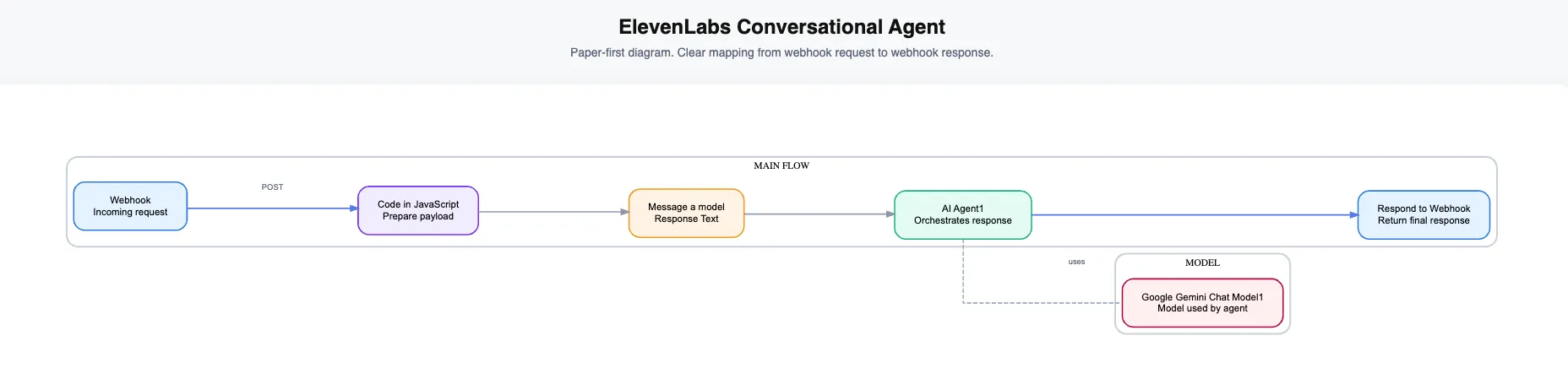
Diagram for the ElevenLabs conversational agent and webhook tool
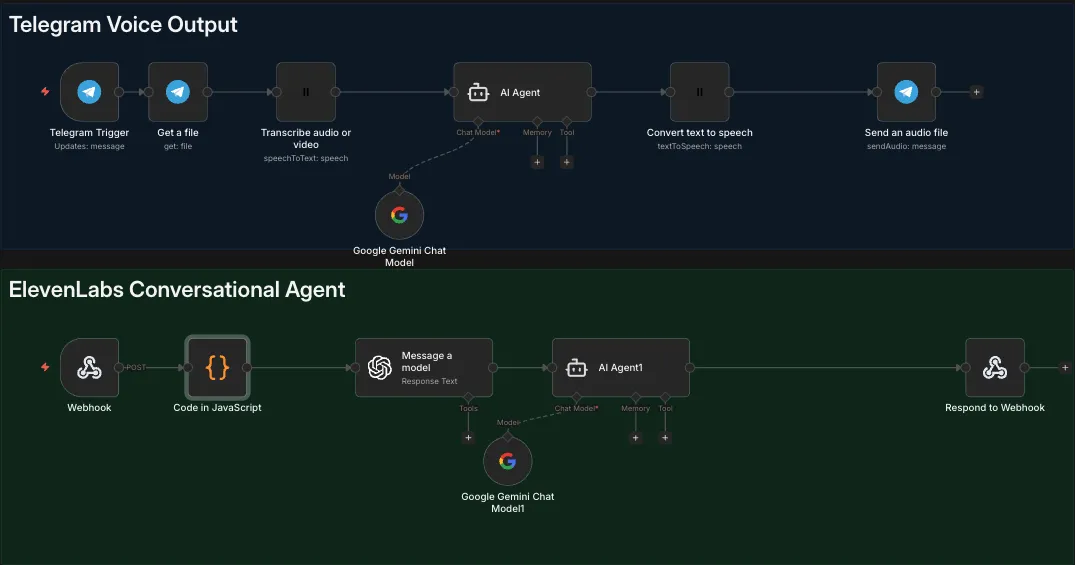
System overview in n8n: Telegram Voice Output and ElevenLabs Conversational Agent
Research and summarization chain in n8n
In n8n, the webhook receives the query text from ElevenLabs and passes it to a ChatGPT message-a-model node to research the web and return a detailed answer from multiple sources.ElevenLabs and passes it to a ChatGPT message-a-model node (Sonar) to research the web and return a detailed answer from multiple sources.
That answer is summarized by an AI Agent node into a short 3-sentence response.
Finally, n8n returns the summary using Respond to Webhook so the voice agent can speak a concise explanation to the caller.
What the user experiences
Telegram setup:
Speak a voice note and get a voice reply.
Real-time setup:
Talk naturally on a call and get short spoken answers powered by n8n.
Next steps
If you want to extend this, the easiest upgrades are:
- Add memory to the n8n agent for better continuity
- Add optional web research only when the question needs it
- Add additional tools to the ElevenLabs agent that call other n8n workflows
Frequently Asked Questions
What is ElevenLabs and why use it for voice AI?
ElevenLabs provides high-quality text-to-speech and speech-to-text APIs with natural-sounding voices. It’s ideal for voice assistants because it supports real-time conversational AI and custom voice agents.
Can I use this setup for phone-based customer support?
Yes. The ElevenLabs Conversational AI setup supports real-time phone calls. Combined with n8n webhooks, you can build voice assistants that answer questions, look up information, and take actions.
Do I need coding skills to build a voice assistant with n8n?
No coding is required. n8n uses a visual workflow builder. You connect nodes, configure settings, and the system handles the rest. Some understanding of APIs helps but is not essential.
How does the Telegram voice setup differ from the real-time agent?
Telegram uses asynchronous voice notes - you send a message, the system processes it, and sends a reply. The ElevenLabs real-time setup handles live phone conversations with instant back-and-forth speech.